
Filename rules
Control which characters and lengths a family file name may use, and what happens when a name does not fit.
Work in progress
Filename rules answer a basic question: which characters may a family name contain? They are the first block on Settings, Family, Naming convention, above the naming pattern.
Filename rules work on the characters. The naming pattern works on the structure of the name. They are separate, and both can be on at once.
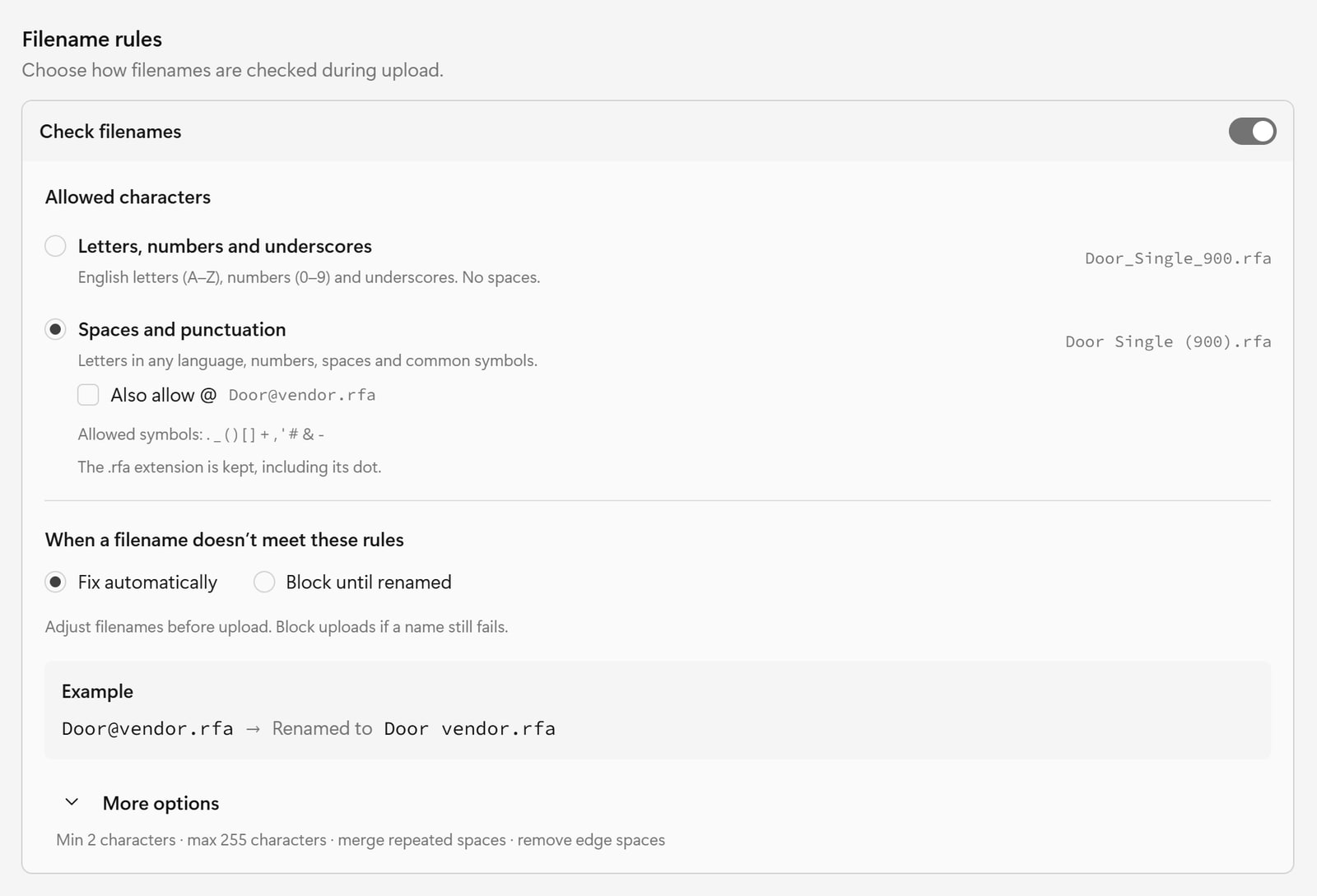
Check filenames
The block has an on/off switch called Check filenames. With it off, no character rules are applied (the app still refuses names that would break the platform itself, such as characters the system cannot store). With it on, the settings below take effect.
Allowed characters
Choose the set of characters a name may use. The .rfa extension is always kept,
including its dot.
| Choice | What it allows | Example name |
|---|---|---|
| Letters, numbers and underscores | English letters A to Z, numbers 0 to 9 and underscores. No spaces. | Door_Single_900.rfa |
| Spaces and punctuation | Letters in any language, numbers, spaces and these symbols: . _ ( ) [ ] + , ' # & - | Door Single (900).rfa |
| Spaces and punctuation, with Also allow @ ticked | The same, plus the @ sign | Door@vendor.rfa |
Also allow @ only appears when "Spaces and punctuation" is selected.
If your account still holds a character rule from an older version of the app, it appears as Custom character rule and stays in force until you choose one of the options above.
Which one should I pick? Choose Letters, numbers and underscores if names
must be safe for every system, such as file servers, scripts, or an exchange
format that dislikes spaces. Choose Spaces and punctuation if people read the
names and you want Door Single (900) to be allowed, or if your team works in a
language with accented or non-Latin letters.
When a filename does not meet the rules
When a filename doesn't meet these rules
| Choice | The app's description |
|---|---|
| Fix automatically | Adjust filenames before upload. Block uploads if a name still fails. |
| Block until renamed | Block uploads until filenames meet these rules. |
"Fix automatically" does not guess what you meant. It applies a fixed clean-up in this order:
- If trim is on, remove spaces from the start and end.
- Keep the extension aside, and replace every character that is not allowed. With "Spaces and punctuation" the replacement is a space. With "Letters, numbers and underscores" it is an underscore.
- If merge repeated is on, collapse runs of spaces (or underscores) into one.
- If trim is on, remove leftover spaces (or underscores) at both ends.
- If the result is longer than the maximum length, cut it, keeping the extension.
Worked examples:
| Setting | You add | The corrected name |
|---|---|---|
| Spaces and punctuation | Door@vendor.rfa | Door vendor.rfa |
| Letters, numbers and underscores | Door Single (900).rfa | Door_Single_900.rfa |
With Fix automatically the file is renamed and uploaded in one go. You are
not asked to rename anything yourself, and no window opens just because a name
was corrected: a new account that never saved a rule uploaded Door@vendor.rfa
and found it in the library as Door vendor.rfa.
A name that still fails after this clean-up, for example one that ends up shorter than the minimum length, is blocked.
With Block until renamed
Nothing is changed for you. Check before upload opens and lists each file as Needs rename, with the reason and a suggested name. You rename the files on your computer and add them again:
Family file name contains disallowed characters: "@". Suggested name: "Door vendor.rfa".
Family file name contains disallowed characters: "!" and contains repeated spaces. Suggested name: "Door glass.rfa".
The Example box under the settings shows Door@vendor.rfa against your
current choices, and says Accepted, Renamed to ..., or Blocked, so
you can see the effect of a change before you save.
More options
Open More options for the limits and the tidy-up switches. Below it, a summary line states in words what is currently set.
| Option | Recommended | What it does |
|---|---|---|
| Set minimum length | On, 2 characters | Names shorter than this are blocked. |
| Set maximum length | On, 255 characters | Longer names are cut (fix) or blocked. |
| Merge repeated spaces (or underscores) | On | Reduces Door Single to Door Single. With "Fix automatically" off, a name containing repeats is blocked instead. |
| Remove spaces at the start and end (or "edge spaces and underscores") | On | Cleans the ends of the name. With "Fix automatically" off, a name with them is blocked instead. |
Each length has its own switch, so you can use one without the other. Length includes the .rfa extension.
The wording of the last two follows your character choice. With "Letters, numbers and underscores" they read Merge repeated underscores and Remove edge spaces and underscores.
Where this is checked
- When you upload.
- When you copy or move a family into a folder with its own naming rule.
- Across the families you already have, in Verify file rules.